Core Features
Grouped by what you are trying to do: build a world, see how it connects, run the session, get unstuck, and keep it all yours.
Build the world
Get a campaign out of your head and into a structure you can navigate.
Quick Start a world
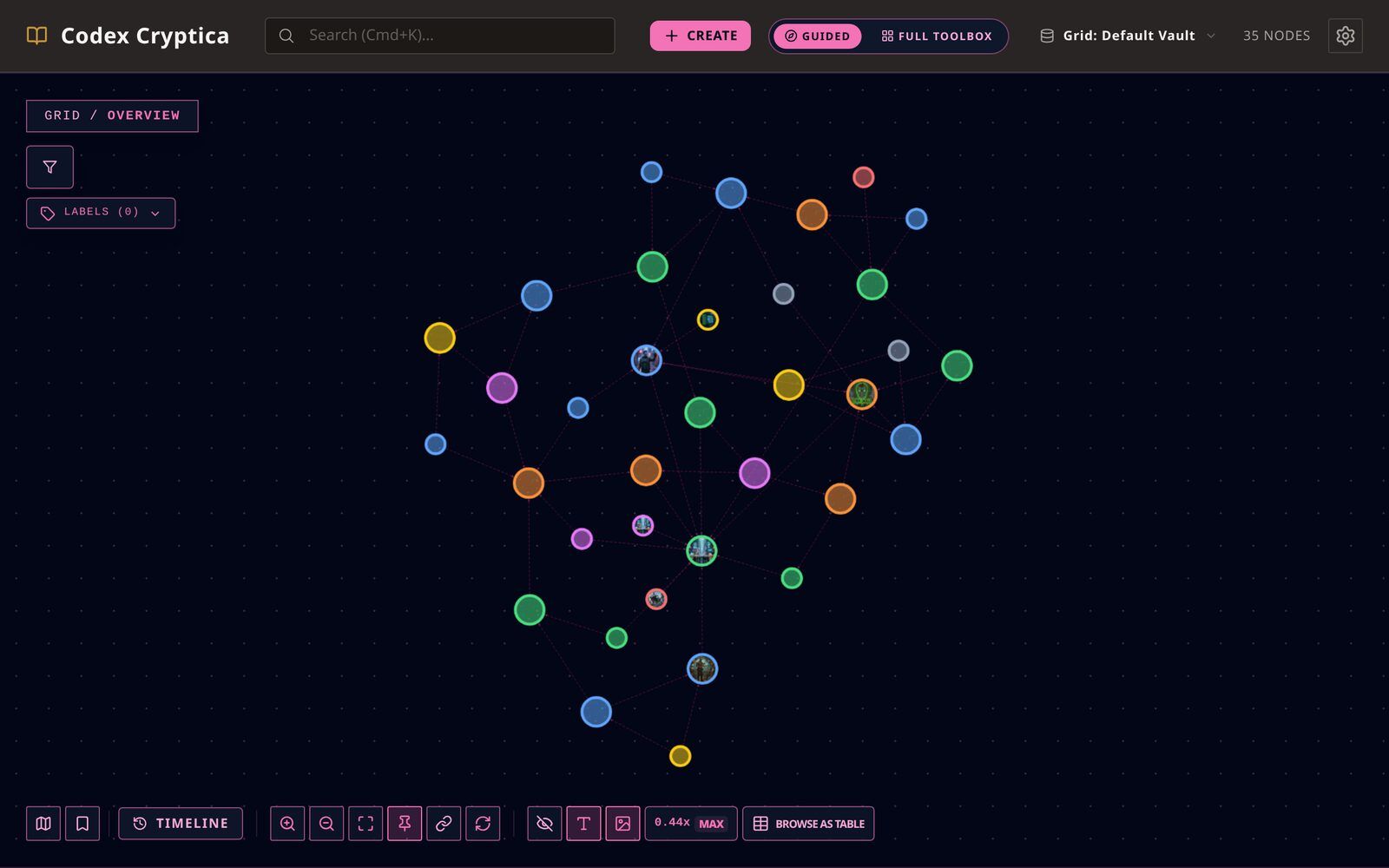
Pick 'Quick Start World' when creating a vault to generate a ready-to-explore 4-6 entity constellation. One choice sets both the genre of the generated world and your workspace appearance, and the dialog previews what you'll get before you commit. Works fully offline.
+ Create
Pick Character, Place, Faction, Event, or Item and Codex Cryptica infers the current context and generates a draft immediately. Click Customize on the draft to reveal the full generator options.
Entity Explorer
Quickly browse and filter all your world entities via the persistent sidebar. Search by title, labels, or alternative names (aliases), and sort by name or last edited time in either direction. Switch between List and Label views to group entities by their labels. Click label pills to filter the explorer, or use Ctrl/Cmd+Click to combine multiple labels for a focused drill-down. On desktop widths of 1280px and above, keeping Entity Explorer open turns the main workspace into a side-by-side reader so you can select an entity on the left and read or edit it on the right. On smaller screens, selection keeps the existing full-screen Zen Mode behavior.
Nested Entities
Organize your world hierarchically. Drag and drop entities in the explorer to nest them under parents (e.g. putting a tavern inside a city), or open an entity and use Set parent beneath its title to search for one; the same place shows the current parent, and lets you change it or move the entity back to the top level. Expand/collapse nodes using the chevron. When you delete a parent, its children are promoted to the root level. Cycle detection prevents recursive loop errors, so an entity is never offered itself or anything nested beneath it.
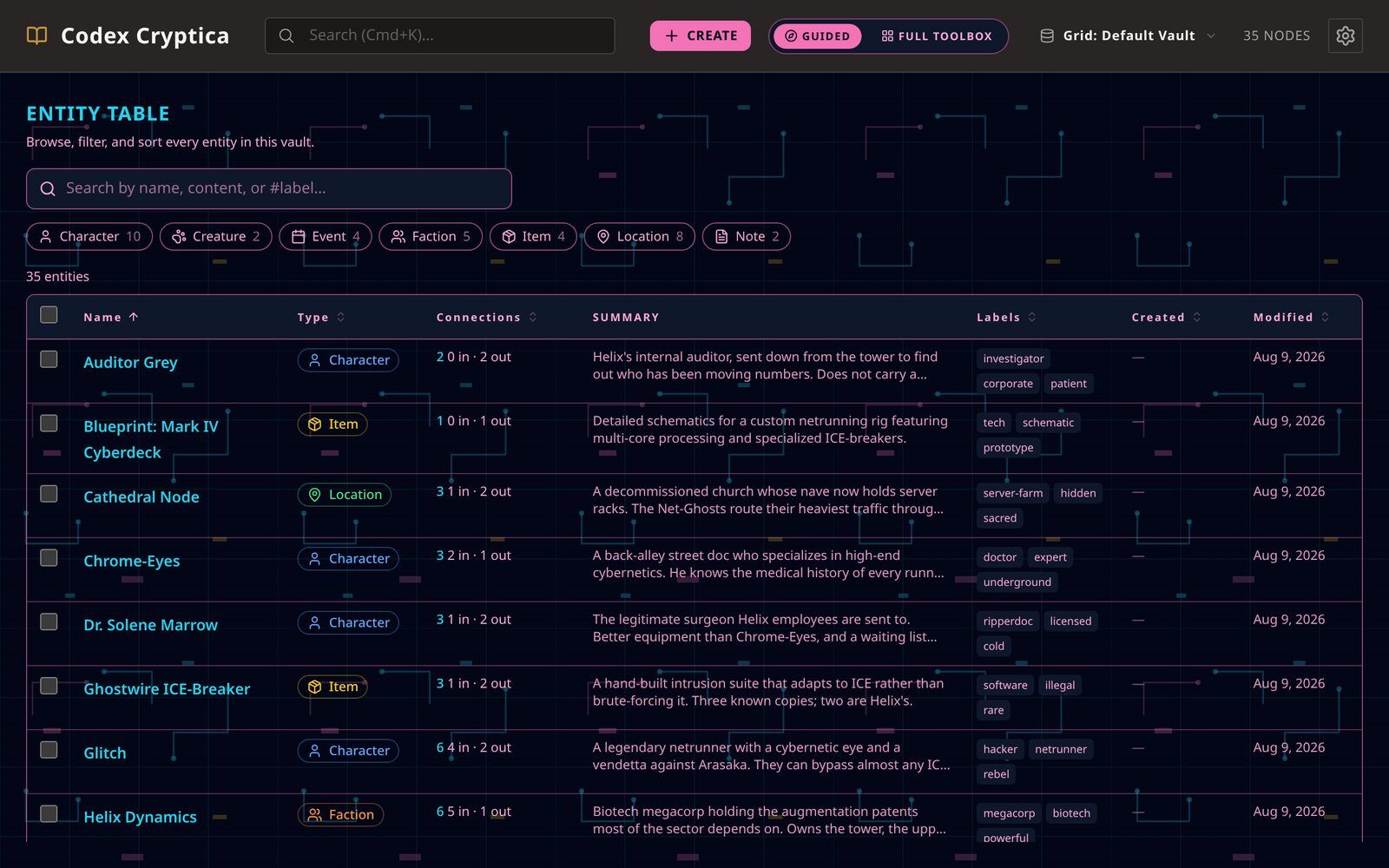
- Table View Filters. In table view, click a type badge or a label chip on any row to filter the table down to matching entries; click again (or use Clear) to remove the filter. Active label filters appear next to the type pills above the table. Every column header with an arrow, including Labels, can be clicked to sort.
- Search Indexing. Search builds quietly in the background when a large vault opens. Early results may be incomplete while indexing is still running. If indexing fails, use Retry indexing to rebuild the local search index for the current vault.
- QuickNote Fast Scratchpad. Capture fleeting ideas instantly. Press Ctrl+I or Cmd+I from anywhere to toggle the glassmorphic fast scratchpad. Jot down thoughts, auto-save drafts, and use the 'Elevate' button to let the AI structure your raw notes into complete Character, Location, or Item draft entities.
- Session Journal. Keep a running record of what happens during play, separate from Quicknote/Scratchpad's transient working notes. Start a Session Journal from the Session Journal button in the toolbar (or the Journal tab of the Quicknote panel), add timestamped notes as the session unfolds, and optionally break a long session into named sections (chapters or scenes). While a journal is running, your dice rolls, card draws and table results are added to it for you, marked so you can tell them from your own notes. When you want to keep something in your world, turn an entry, a section, or the whole journal into a draft entity: choose a type and a name, and the text is filled in for you to edit and approve. The journal itself is never changed. End the session when you're done — the journal stays around afterward, and you can resume an unfinished one exactly where you left off next time. Any entry can be edited (typed notes only), moved up or down, or deleted. If cloud backup is enabled for this vault, journals are included in what gets backed up and restored, same as your entities, maps, and canvases.
- Pick Dates. Select dates using smooth, center-snapping scroll wheels or direct text entry (including era labels like 312 BF). Features side-by-side vertical tracks, era selectors, intercalary anchors, inline repair warnings on calendar change, and quick keyboard year/day overrides.
- Calendar Eras. Configure historical eras (such as First Age, Second Age, or Before the Fall / After the Fall) in Vault Settings. Each era can reset year numbering or count backward into the past. Dates across all views display with the appropriate era label while the underlying chronology keeps a continuous integer timeline for precise ordering.
- Creature Packs. Populate a new vault fast with Creature Packs: curated sets of ready-to-use creatures. Open the Importer, scroll to the Creature Packs section, click a pack to preview every creature, deselect any you don't want, then import the rest. Each creature lands as a normal, fully editable entity in your vault. Works without an AI connection.
- World Front Page. Use the briefing field to edit the world blurb directly. If it is empty, the Generate Briefing button appears inside the field; if it already has text, the generate action moves to the bottom next to Save Briefing. Tagged `frontpage` entities stay pinned at the top of recent entities and show their chronicle/body preview there.
- Switching Stories. Change your world. Click the folder name at the top to switch to a different story.
- Presentation Templates. Change how a Stat Sheet looks without touching its data. Click Presentations to switch between built-in layouts, or write your own in Markdown with field references like {{stat.hp}} and layout sections for groups, cards, and rows. Repeatable Table fields (used for Weapons/Items by default) keep rows of data together: add rows, edit their cells, adjust counters, and roll dice from the table. In the template editor you can customize a Repeatable Table's own column headings and cell types (text, number, dice, counter, or checkbox) so the same table type covers skills, spells, or any other list your system needs, and you can turn off vault-item linking for tables that aren't about items. A live preview and inline warnings catch typos or removed fields as you type, and every layout can be exported and shared with anyone using a matching schema.
- Entity templates. Pick the markdown a new note starts with. Duplicate a built-in template to make your own, edit it as plain markdown, then set it as the default for that type. Changing a template only affects notes you create afterwards; existing notes stay as they are.
- Entity Reports. Turn a group of entities into a readable document. On a Spatial Canvas, click Generate report in the toolbar. In Graph view, select some nodes and choose Generate report. In Table view, tick some rows and use Generate report in the selection bar. A preview appears where you choose the scope (canvas only), what to include, and how much detail to show. GM-only secrets stay out unless you turn them on. Press Save as note to keep the report as a normal note in your vault, then read and edit it like any other entity. Regenerate refreshes a report from its original source and asks first if you have edited it, and Export copies it as Markdown for use in other tools.
See how it connects
The relationships between people, places and events become visible instead of remembered.
Visual Graph
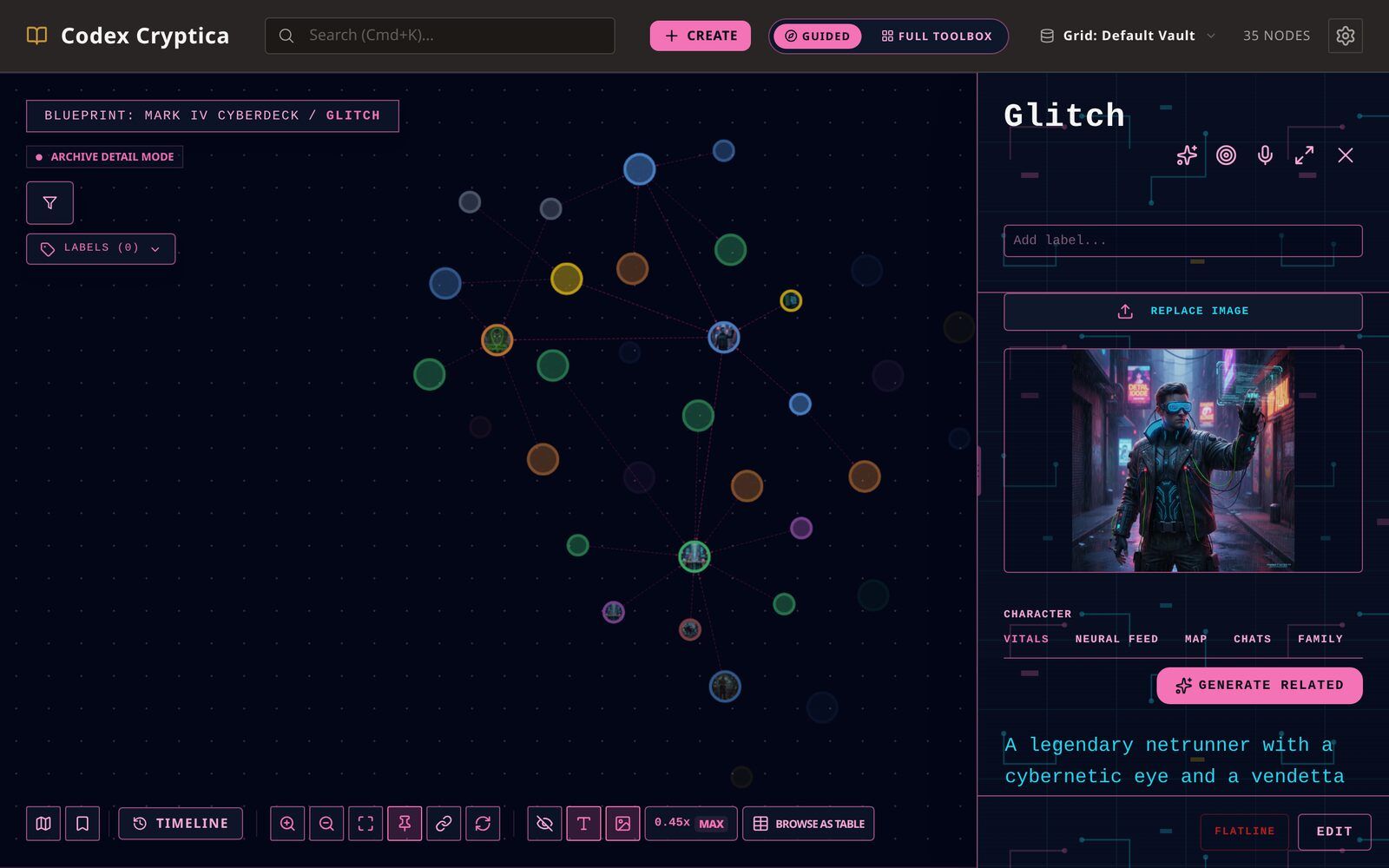
Navigate your lore through a dynamic, interactive web. On a phone, the graph starts near a useful entity; use Fit to Screen in the graph controls whenever you want an overview. Drag to pan, pinch to zoom, and tap a node to open it. Nodes grow visually larger as visible links accumulate around them, making major lore hubs easy to identify at a glance. The drawing needs a pointer and a screen, so Browse as table in the graph controls opens the same entities as a keyboard-friendly list, and each entity page names its connections and their direction.
Linking Notes
Connect people and locations. Click one item then another to link them together, or right-click two selected items to connect them.
Entity Links in Content
When reading an entity's content or lore, names of other vault entities are automatically highlighted as clickable links. Click any highlighted name to navigate directly to that entity. Links work with full titles and registered aliases. They only appear in read mode; the editor shows plain text while you are writing.
Spatial Canvas
Drag cards into a freeform layout, then right-click a card to lock it, bring it to the front or send it to the back. Use Auto-arrange for a one-time board layout; there is no grid snapping or automatic sorting. Positions and card settings save with each canvas. Click the workspace name to create, rename, delete or switch boards. Sketch with the pencil, erase individual strokes, and rotate cards with a two-finger twist or the desktop rotation handle.
- Family Tree. Open the Family tab on any character to see their parents, partner, children, and siblings laid out as a tree. Add family from the buttons below the tree (connect an existing character or create a new one) and the matching link is added to both people automatically. In the full-screen view, choose Lineage to explore every recorded generation. Drag to pan, scroll or pinch to zoom, and use the branch controls or Show all generations to reveal more. The tree is built from your normal connections, so nothing is stored twice.
- Explore the lineage. Drag to pan, scroll or pinch to zoom, and use ⊞ to expand a branch. Choose Show all generations to reveal the whole recorded lineage.
- Connections. The Connections tab puts this entity in the middle and arranges everything linked straight to it around the edge: links you made, links others made to it, and anything filed under it, each one labelled with its relationship. Click any surrounding entity to open it. Connections that do not fit comfortably in the picture are listed underneath it, still one tap away. The view stops at one step: to follow a chain further, open the next entity and look at its Connections, or use the graph.
- World Chronology. Browse your world's history in Calendar mode (month grid) or Agenda mode (chronological list). The calendar shows your world's own year; use Previous / Next to navigate months, or click the month title to jump straight to a year with the scroll picker. Click an entry to open it in the detail panel; double-click to open it full-screen. Double-click an empty area of any date cell to open the entity creation form with that date pre-filled as the start date. Drag an entity from the left sidebar onto any calendar day to set its start or end date. If an entity has a date, click that date text in the detail panel to jump the calendar straight to it. Approximate and undated events appear only in Agenda mode under 'Undated/Approximate'. Use the Type, Label, and 'include undated' toggles to narrow what's visible.
- Entity Timeline. Open any entity's detail panel and click the Timeline tab to see a chronological list of the events linked to that entity: battles, foundings, discoveries, and more. Events are sorted earliest to latest. Undated events appear at the end under an Undated heading. Click any event to open its full detail page. The timeline is read-only; to add an event to an entity's history, link the event using the entity's connections.
- Multi-Selection Actions. Use the toolbar to quickly Apply Labels to multiple items or Merge duplicates into a single entry.
Run the session
What you prepared is usable at the table, with your players.
VTT Mode
Turn the map into a lightweight tactical board. Add tokens, move them with grid snapping, manage initiative, measure distances, and save encounters without changing the underlying map. Select a token and drag the handle above it or its facing indicator ring to rotate its facing; Alt+Left/Right rotates it in 45-degree steps. Right-click a token and open Appearance to show its facing indicator or switch between circle and square bases.
Map Mode
Plot your world data onto custom geographic or tactical canvases with persistent pins and Fog of War.
Hide Secrets
Keep secrets hidden. Hide items from your map so players don't see them during a session. Press `P` to toggle the preview.
Hexcrawl & Hex Grids
Run overland exploration with point-to-point hex grids. Choose pointy-topped or flat-topped orientation, toggle in-cell coordinates, snap tokens and pins to hex centers, and reveal or hide fog of war by hex. Rulers measure travel distance directly in hexes.
- Sharing a Link to an Entry. In a shared world, every entry has a link button (next to the entry title in the side panel and in the full-screen view). It copies a direct link that opens that entry full-screen for anyone you send it to. While browsing a shared world, the address bar also carries the current entry, so copying the address works too.
- VTT Entity List. Open Vault Entities in the VTT sidebar to search your world notes, then drag characters, creatures, or items straight onto the map to create tokens. A ghost marker follows your cursor so placement stays precise.
- VTT Tile Decks. Use Tile Decks in the VTT sidebar to add a starter pack (Scribble Dungeons, Geomorphs 2013, Geomorph Collection) or import your own PNG or JPG images. Filter the tile palette by category, choose a specific tile, draw one at random from a deck, or use "Draw from all decks" to pull from every installed deck at once. New tiles snap edge-to-edge against tiles already on the map. Starter tiles are downloaded once into the current vault, so drawing remains available offline.
- Map Layers. Every placed tile and token belongs to one of three layers (Terrain, Furniture, or Tokens), always drawn in that order so tokens never disappear beneath the map. Click LAYERS in the VTT toolbar to pick which layer new placements land on; only items on that active layer can be clicked, selected, or dragged, so you can safely work on furniture without nudging tokens or terrain by accident. Hide a layer to declutter your view, or lock one to stop edits entirely (a locked layer blocks even the GM). Right-click an existing tile or token and choose Move to Layer to reassign it. Players moving their own token are never restricted by your active layer.
- Map Notes. Pin a note anywhere on the map to remember what happens there. Press the note button, then click the spot it belongs to and write down whatever you want to remember; press Escape to back out without placing one. Notes are not just for VTT mode: the button sits in the VTT toolbar while you are in play and in the map bar when you are not, and a note stays clickable and draggable either way. A note lands folded down to a marker, no bigger than a lore pin, so a stocked dungeon does not bury the map art underneath it: double-click a marker to open the note, and double-click again to fold it away. Shift+scroll over an open note to resize it. Note text takes basic markdown, and the toolbar above the note body writes it for you: bold, italic, headings, and bullet lists all show through on the note face on the map. Notes start hidden from players, so you can stock a dungeon ahead of time; right-click one and show it when the party finds it. Select a note to edit its text, and drag it to move it, whichever layer you happen to be editing. When you roll on a table, "Pin to map" drops the result straight onto the map as a note, so a rolled encounter stays attached to the room it belongs to. A note lives and dies with the session; for the one that turns out to matter, "Keep in vault" writes it into your vault as a Note entity and links the marker to it.
- Die Roller. Perform polyhedral dice rolls via the /roll command in Oracle chat or using the dedicated Die Roller modal. Click dice icons in quick succession to roll multiple dice at once, and use the reroll button to instantly repeat any previous roll.
- Random Tables & Card Decks. Keep your encounter tables, loot lists, and oracle decks in the vault and roll them mid-session. A table holds entries you can weight or assign explicit die ranges to. Create custom tables manually, paste external spreadsheets via the Import Wizard, or use 'Generate with AI' to build world-grounded random tables referencing your vault's NPCs, locations, and existing sub-tables. Candidate rows appear in an interactive staging review where you can edit, select, or discard entries before adding them. Write {source_name} inside an entry to pull a result from another table (e.g. {weather}), and click recognized entity chips in roll results to immediately inspect linked world lore. Decks work similarly by dealing cards without replacement. Roll or draw from the Oracle chat with /table and /deck commands.
- Session Voice Chat. Talk to your players without leaving the app. While hosting a live session, press the Voice button in the header to open a voice channel. Connected players can join from their own header, mute their microphone, and see who is in the channel.
- Guest Character Chat. Invite world participants to chat in-character with NPCs. GMs can enable guest chat on specific characters, configure a 'Public' or 'Hybrid' context scope, and review synced transcripts to promote emergent lore directly into official rumors. In a private host chat, choose a campaign character to speak as so the NPC can respond to their role and relationship. If you speak as another saved character, that conversation also appears (read-only, with a link back) under that character's own Chat tab.
- Solo Adventure Mode. Let Oracle run a grounded, system-light adventure from your vault. Your session stays separate from normal Oracle chat, and GM notes are hidden from the play surface but not encrypted from the vault owner. The play surface stays quiet by default: dice presets, roll history, resource counters, provisional facts, and the adventure archive live behind the Adventure tools panel, open it when you need them. Fullscreen is optional for an even quieter view; Escape leaves browser fullscreen without leaving the adventure. When a player-visible person, place, faction, item, event, or clue first appears, you can choose Add to Codex to save its visible summary as a normal campaign entity. The adventure archive lets you rename, duplicate, search, and resume past sessions. "Fix something wrong with the current situation" lets you correct what the player currently knows; it never touches anything the GM is keeping hidden. Optional dice presets, a roll history, and simple named resource counters (ammo, favor, a countdown) are there if you want a bit more structure, but nothing about them is required.
- Public World Directory. Sharing by link and listing publicly are separate choices. A guest snapshot stays unlisted until you open Publishing Settings, review the public preview, and save a directory listing. The public directory exposes only the saved title, description, labels, optional cover image, optional owner name, and the read-only guest link. All listed worlds display a provenance and copyright notice confirming they are user-created and independently published without rights-holder endorsement. Authors must confirm they have the legal right to publish their content, and visitors may report potential copyright concerns for moderation review.
Get unstuck
A draft when you need one, that you edit rather than accept.
AI Oracle
Chat with the AI about your world. Ask questions, brainstorm ideas, or get help writing descriptions directly from your notes. Use the system proxy for free access, or add your own API key for direct connection.
Campaign Generators
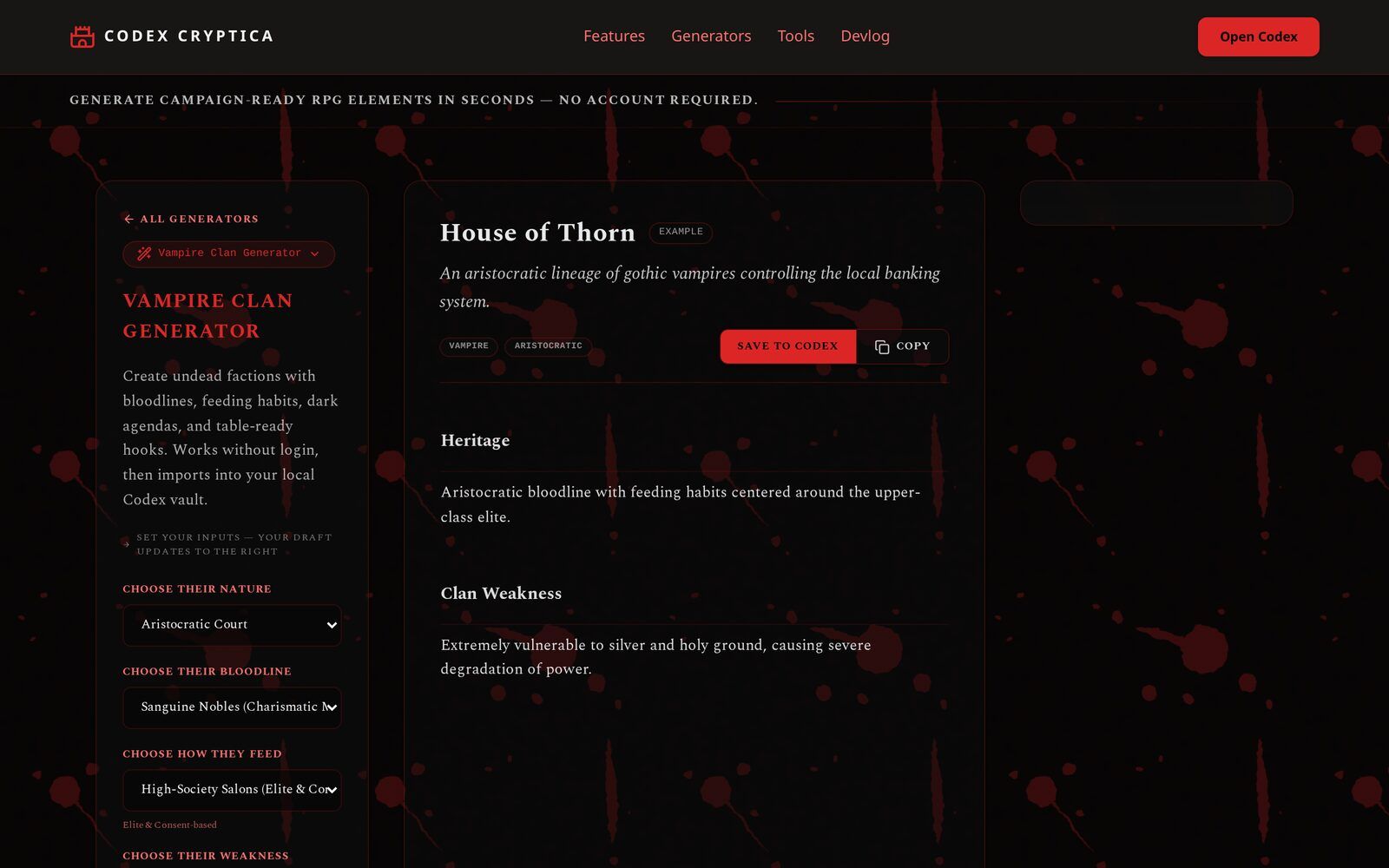
Generate NPCs, factions, settlements, dungeons, and magic items directly inside your vault. Search by generator name, category, or description to find the right tool quickly. Star generators you use often to keep them at the top; favourites are saved in this browser only. Use Refine on a generated result or a Session Hub entry to ask for a focused change, review the new version, refine it again, or use it. Confirming replaces the source draft with the accepted revision while keeping its lineage.
Share a generated result
Choose Share on a generated result or a Session Hub draft to create an immutable public snapshot. Your original draft stays private and later refinements do not change the link. Phones can use the native share sheet; on desktop, Share copies the link. Shared pages are not added to search results. If you created the link in this browser, open it again to revoke it. Sharing sends the selected text to Codex Cryptica's Cloudflare-hosted snapshot service only after you choose Share; it is separate from your local vault.
Secret Societies & Cults
Use Campaign Generators to create a cult, sect, conspiracy, or hidden order as a Faction draft. Choose its public face, danger, and relationship to the truth; the result includes doctrine, rituals, recruitment, hierarchy, a sacred object or site, clues, conflicts, and follow-up ideas. Review it before saving, then link its leader, meeting site, rivals, and rumours to the rest of your vault.
- Holidays & Festivals. Create one observance or a connected calendar of 6, 10, or 14 days. Add a society's culture, seasons, beliefs, political history, important people, or events as context; the generator treats those details as candidates, not a checklist. Each observance includes traditions, who observes it, what outsiders misunderstand, and a table-ready tension. Review the note before saving it to your vault.
- AI Suggestions. The AI finds new links in your notes and suggests connections you might have missed.
- Reviewing Drafts. Draft entities stay separate from your active lore until you review them. Open the Review tab in Entity Explorer, or use the draft controls in the entity panel, to approve or reject them.
- Oracle Connection Modes. The Oracle works in two modes: System Proxy (free, uses shared access) or Custom API Key (direct connection to OpenAI/Luna). The status badge in the Oracle sidebar shows which mode is active.
- Oracle Memory. The Oracle remembers your chat and the notes it has already seen, so each new question only sends what changed, and replies come back quicker and use less of your quota. To do this on the free System Proxy, your conversation and the notes it references are briefly stored on the AI provider's servers (up to 55 days) and then expire. Your vault always stays on your computer; only the chat does this. To keep everything fully on your device, use your own API key instead of the System Proxy.
- Oracle Automation. Entity Discovery controls whether Oracle surfaces discovered records as suggestions. Connection Discovery controls whether Oracle surfaces link suggestions after it creates or updates a record.
- Proactive Discovery. While you chat, the Oracle can identify new characters, locations, and items. In Settings, choose whether discoveries are off, shown as chips for review, or saved automatically as drafts.
- AI Description Revision. Instantly generate or refine entity descriptions. The AI produces both a player-facing 'Chronicle' and a GM-facing 'Lore' entry based on your existing notes, tags, and connections. Review and save changes directly within the entity detail view.
- AI Generated Art. Save art made by the Artificial Intelligence (AI). You can drag any image created by the AI onto an entry to save it as their portrait.
- Instant Visualization. For Advanced Tier users: Instantly generate visuals for your lore. Look for the DRAW button on Oracle responses, entity panels, Zen mode, and graph nodes. The AI uses Art Direction from normal notes or entities, then Category Defaults and the active Default Art Style.
- Drawing Gods and Legends. A picture of a god should not look like a picture of a villager. Label an entity 'deity', 'god', 'divine', 'immortal' or 'titan' and its images are drawn in materials beyond mortal making, lit from within, and framed from below. 'legendary' or 'demigod' does the same a step down. Everything else is drawn as ordinary, and the entity panel shows which one is in effect. You can also set it for a single picture under Advanced art direction when you review a prompt.
- Adventure Idea Generator. Generate campaign-ready adventure concepts tailored to your world theme. Each scenario features an initial situation, primary pressure, key locations, important NPCs & factions, threats, discoveries, complications, stakes, and non-linear outcomes.
- Quest Hook Generator. Create a playable quest hook with a clear inciting event, threat, complication, twist, and meaningful reward. After generating a hook, choose Generate Plot Twist to carry that exact result into the Plot Twist generator and develop its next reversal.
- Rumour Generator. Generate a d6 table of six local rumours -- each naming a real lead the party can chase, with a source, but no quest structure. Behind the scenes, four are essentially true, one is an exaggeration, and one is a dangerous misconception; which is which stays in the GM-only notes and is never shown to players.
- Encounter Generator. Generate a playable combat, social, exploration, environmental, or mixed encounter -- not just a monster list. Each output includes an at-a-glance summary, a player-facing description, participants and their motives, environment, non-combat approaches, a complication, and outcomes/rewards. Threat is described in fictional terms so it works with any RPG system.
- Dungeon & Delve Generator. Draft multi-sector subterranean complexes, ancient ruins, precursor alien vaults, or cybernetic facilities. Each output includes architectural atmosphere, key sectors/levels, inhabitant factions, central secrets, hazards, treasures, and adventure hooks. After generating a delve, choose Generate Boss / Key NPC to create a site-anchored Character draft complete with lair sector, alert escalation, and inhabitant relationships.
- Sci-Fi World Generator. Create campaign-ready planets, moons, and artificial worlds with a clear physical identity, societies shaped by their environment, resources, dangers, notable locations, mysteries, conflicts, and adventure hooks. Start it from Campaign Generators for a standalone world, or open it with existing system context to develop a world that fits the star, orbit, factions, and conflicts already in your campaign. Drafts remain local until you choose to save them.
- Fictional Languages. Design structured language profiles (conlangs) with pronunciation guidance, naming structures, example names, phrases, and a glossary. When generating an NPC, faction, settlement, or ship, choose one saved Naming language to apply its rules. No language is applied automatically.
- News Sheets (In-World News). Create an in-world news sheet for your campaign: a lead headline, short articles, street rumours, classifieds, and adverts, all written the way the publication's owner would allow. The handout part is safe to show players; the GM section keeps the truth behind the stories and the adventure hooks. Generated inside a vault, the sheet reports on your existing places, factions, and events.
- Plot Twist & Complication Generator. Start with an existing premise, scene, or campaign problem and generate a coherent reversal or complication. The generator preserves established facts, identifies an assumption that can be overturned, adds foreshadowing and consequences, and gives the players new choices. Add campaign context or constraints when you need the twist to fit an existing storyline.
- Delve Spatial Canvas Builder. Transform dungeon concepts into interactive spatial canvas maps. Open a generated dungeon concept and click 'Build Delve on Canvas' to create a .canvas layout with sector group frames, tactical Area role badges, custom passages (hidden, locked, vertical), and context-aware stocking. Every new delve ends with a dedicated Climax Area chosen by AI from the Location's established canon. Its editor records what is at stake, the players' decision, and possible outcomes, so the finale can be a confrontation, negotiation, ritual, revelation, crisis, siege, escape, or another decisive turn rather than a required boss fight. When the layout is ready, use Finalize Dossier to create a linked GM Note containing the original briefing, every populated sector and Area, room-level connections, climax outcomes, a fitted image of the complete map, and a link back to the canvas. Finalize again after edits to refresh the image and update the same Note.
Your data stays yours
Local files you own, and all of it works with the AI switched off.
Total Privacy
Your notes stay on your device. We use local storage for maximum security with no cloud accounts required.
Load and Save Folders
Use the linked folder as an external copy of your world. Save writes your internal archive to the folder for backups or editing in tools like Obsidian. Load pulls folder changes back into the app when you want to bring them in.
AI Disabled
Prefer a non-AI experience? Enable AI Disabled in Settings to disable all AI-powered features. The Oracle remains available for utility commands like /roll, /create, /connect and /merge.
Codex Interchange Format (CIF) Import
Drop a .cif.json or .cif.zip file exported by another compatible worldbuilding tool to bring its entities, hierarchy, links, and images into your vault, entirely offline, with nothing sent anywhere. A raw Thread Weaver campaign export works too; it's converted to CIF in your browser automatically before the same review step. ZIP packages carry pictures: each one is checked against its declared fingerprint before import, attached to its entity, and stored once even if you re-import. Broken files are rejected before you ever see a review screen, naming what's wrong. Re-importing a later export matches existing entries by their stable identity (never by title), so you can update, skip, or create per entry and see exactly what changed. Relationship labels like 'mother of' become real family links, the same as anywhere else in the app.
- Save to Folder. The 'SAVE TO FOLDER' button writes your internal work to the linked folder. It only enables when you have unsaved changes, keeping the folder copy current.
- Load from Folder. Use 'LOAD FROM FOLDER' in Switch Vault to refresh your internal archive with changes from the linked folder. A safety gate warns you if unsaved internal work would be overwritten.
- Cloud Backup. Keep a copy of a vault in Codex Cryptica Cloud so you can get it back if you lose this device. It is off until you turn it on, and the consent screen explains exactly what is stored and who can read it. Turning it on creates a recovery key; that key is the only way back to your backup, so copy it somewhere safe. It is one value covering both halves restoring needs, so the Copy recovery key button gives you everything. If this vault is already saving from another device, Attach this vault to an existing backup links it to the same cloud copy instead of starting a second one. You can stop backing up, or delete the stored copy for good, at any time. A vault is mirrored to one cloud at a time: pick either Google Drive or Codex Cryptica Cloud under Cloud copy in Vault settings, since each would otherwise restore over the other.
- Smart Importing. Safe file loading. If a file import stops, just pick the file again to finish where you left off.
- The Shelf. Send an entity, or a whole selection, to the Shelf, switch vault, and import it there. Stat sheets, images, sound bites and links all come across. The Shelf lives in this browser only: it is not a backup, and it cannot send anything to another person or another device.
Ready to start?
Join the next generation of storytellers. Start building your world with absolute privacy and smart tools.
Enter the Codex