How to
How do I track monsters, initiative, and hit points during D&D combat?
Keep the full monster stat blocks open for reference and track only what changes in the fight: each combatant in initiative order, current hit points (HP), conditions, and the Armour Class (AC), attack and save numbers you will look up most often. Number duplicate monsters, update HP and conditions on one tracker, and roll saving throws from the stat block only when an effect asks for one.
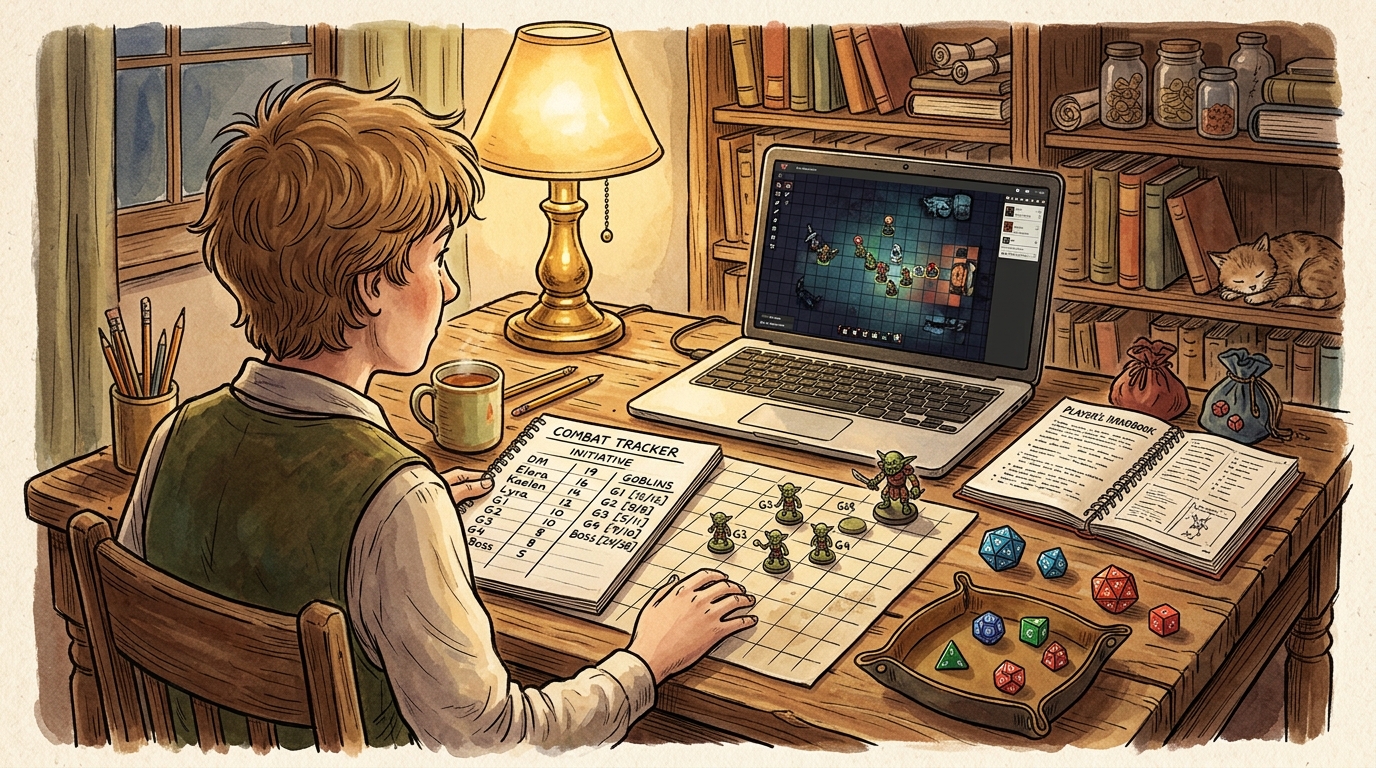
Track what changes, reference what stays fixed
Three terms cover most of the bookkeeping. Initiative is the turn order for the encounter. Hit points, usually shortened to HP, are how much damage a creature can take before it falls. Armour Class, usually shortened to AC, is the number an attack roll must meet or beat to hit. Initiative and current HP change during the fight. AC, attack bonuses and saving throw modifiers mostly stay fixed for a given monster, so they belong in a reference you can glance at rather than in rows you rewrite each round.
When an effect calls for a save, use the ability it names and the DC (Difficulty Class) it gives. In a 2024 monster stat block, use that ability's Save modifier. In a 2014 block, use the printed bonus if the ability appears under Saving Throws; that total already includes proficiency, so do not add it again. If the entry is absent or does not list that ability, use the ability modifier shown with the score instead. See the 2014 monster rules and 2024 saving throw rules.
That split is the whole method. One short tracker holds the changing state of this encounter. The books, handouts or digital stat blocks you already have hold everything else. If you copy a full stat block onto the tracker for every goblin in the room, the tracker stops being quick to read at the exact moment you need it most.
What belongs on the tracker and what stays in the stat block
| Keep on the tracker | Keep in the stat block reference |
|---|---|
| Name or token label, such as G2 or Boss | Full ability scores and skills you rarely use |
| Initiative result and place in the order | AC, speed and the main attack and damage lines |
| Current HP after each hit or heal | Saving throw modifiers for each ability |
| Active conditions and when they end, if the effect says | Special abilities, reactions and legendary actions, if any |
| Concentration, if the creature is holding a spell | Resistances, immunities, senses and languages |
Three workable setups
Pick the setup you can operate while still describing the scene and listening to your players. Discord can carry the conversation in any of them; it does not have to carry the combat state as well:
- Paper, a notebook or a simple spreadsheet One row per combatant with columns for initiative, name, current HP, AC and conditions. Keep a bookmark, tab or printed page for each monster type in the encounter, not one copy per creature. This costs nothing, works offline, and is easy to correct with a pencil. It asks you to do the arithmetic yourself, so keep the rows few and the handwriting large enough to read at speed.
- A light shared map, plus a tracker beside you If your group uses a simple shared map only to show where everyone stands, put numbered tokens on the map so G1 to G4 match your rows, then handle initiative, HP and conditions on your own paper or spreadsheet tracker beside the screen. Keeping position on the map and arithmetic on a separate sheet is a complete setup, not a compromise, and it avoids learning extra tracker extensions mid-fight.
- Codex Cryptica's battlemap, tokens and initiative list In Codex Cryptica's Map view, place numbered tokens on the battlemap and link them to creature entities. Tokens linked to the same entity share its HP, so use a separate linked entity for each creature that needs its own HP, or track HP on paper or a spreadsheet. With VTT enabled, double-click a token to open its health bar and change the linked entity's HP; right-click to mark statuses such as Dead, Stunned, Prone, Poisoned or Invisible. Select a token and choose Add to Initiative to track the turn order and rounds in the Combat sidebar, pop the initiative list into a separate window for a second screen, open the linked creature entity from the token details or initiative row when you need a save or attack, and save an Encounter Snapshot if play pauses mid-fight.
A copyable starter tracker
| Init | Combatant | HP | AC | Conditions and notes |
|---|---|---|---|---|
| - | Name or token label | Current / maximum | Number | Condition, concentration, end timing |
| 18 | Example: G2 | 8 / 11 | 13 | Prone until it stands |
| 12 | Example: Boss | 20 / 24 | 14 | Concentrating, spell name noted |
How to read the starter tracker
Copy the headings into a notebook, a notes app or a spreadsheet. Add one row per creature that can act or be hurt, including the player characters in initiative order if that helps you call turns. The AC column is a copy of one number from the stat block so you can answer hit or miss without opening the book each time. It is still a reference value; the changing number beside it is current HP.
The values in the example rows above are invented to show the layout. Use the HP, AC and attacks from the stat blocks at your table. Number duplicates before the fight starts and use the same labels on the map tokens, the tracker rows and any condition markers. When a creature is defeated, cross out the row or remove the token rather than leaving a zero you have to interpret later.
Example
Worked encounter: four goblins and a boss
Four similar enemies and one leader is where new Dungeon Masters often feel the bookkeeping spike. The tracker below is a snapshot after initiative has been rolled. Its HP and AC figures are illustrative values for the layout only, not a reproduction of any published stat block. At your table, copy those numbers from the stat block you are using.
- The tracker at the start of round one
- Initiative 18: G2, HP 11, AC 13, no condition. Initiative 16: fighter, HP as the player reports. Initiative 14: G1, G3 and G4 sharing one initiative result, HP 11, 9 and 11, AC 13. Initiative 12: Boss, HP 24, AC 14, concentrating on a spell. Initiative 9: cleric, HP as the player reports. Under the 2014 and 2024 fifth-edition rules, identical creatures share one initiative roll by default; separate rolls are a table variation. Either way, HP stays individual per creature.
- G2 takes a hit
- The fighter rolls an attack total of 15 against G2. You compare it with the AC 13 already on the tracker, so it hits without opening the stat block. The player rolls 6 damage. Cross out 11, write 5. Say what the table can see: G2 staggers but stays up. No other row changes.
- G3 gains a condition
- A spell knocks G3 prone. Write Prone in its conditions column and mark the token if your map tool has a marker. You do not need to recalculate anything else on the row. When G3 acts, it can stand using movement as your rules provide, and you clear the word from the tracker at that point.
- The boss acts and a save comes up
- On the boss turn, check the stat block for its action rather than relying on memory. Later, the cleric casts a spell whose effect calls for a Dexterity save against DC 13. DC means Difficulty Class: the roll must meet or beat it to succeed. For this invented, non-damaging illustration, suppose a failed save restrains the target until the end of its next turn. The boss's Dexterity save modifier is +2, so roll a d20: 9 + 2 = 11 < 13. The boss fails; leave its HP at 24 and add Restrained to its tracker row until the end of its next turn. Its concentration note stays unchanged because this example deals no damage. The save modifier came from the stat block, and the roll happened only when the effect called for it.
- Why it works
- Each creature kept its own HP even though three of them shared an initiative slot, so damage to G2 did not blur into damage to G3. AC was close enough to answer quickly, while saves and special abilities stayed in one reference per monster type. The tracker stayed at five monster rows for the whole fight.
A fast workflow before, during and after combat
Run the same small loop each encounter and the tracker becomes habit:
- Before play Gather the stat block for each monster type, not each individual. Create and number the tokens, prepare the tracker headings, and decide whether similar enemies will share initiative at your table.
- When combat starts Ask for initiative, write the order once, and fill in current HP and AC from the stat blocks. Put the order where players can see it if your setup allows, and tell the first two combatants they are up and next.
- During each turn Change only what the turn changed: subtract or add HP, add or clear a condition, and note concentration when a creature starts or loses a spell. Look up an ability or save in the stat block only when the turn needs it. Announce who is next before the current turn fully ends.
- When a creature falls Remove the token or cross out the row, clear its conditions, and move on. If the remaining enemies have lost their reason to fight, consider retreat or surrender instead of tracking a foregone finish to the last point.
- After play Keep notes that affect the campaign: who escaped, who was captured, what the party promised, and any injury or resource loss that carries forward. Round by round HP tallies and expired conditions can be thrown away.
Common traps for a first combat
Keep the tracker to changing state and one or two lookup numbers. If you find yourself searching it, it has grown too wide.
A virtual tabletop can become a second job if you add extensions, modules and automation faster than you learn them. Add one aid at a time, test it away from the table, and keep the paper method in reserve for the night a tool updates or a browser tab fails. Switching tools mid-campaign does not by itself fix slow combat; the tracker habit transfers, the software does not do the thinking for you.
Conditions and concentration are easy to drop because they often have no number attached. Writing the condition in the row, and a short note of when it ends if the effect gives a timing, prevents the two questions that stall a round: is that one still prone, and was it still concentrating?
Starter checklist for your next encounter
Set this up once and reuse it:
- Write the tracker headings: initiative, combatant, current HP, AC, conditions and notes.
- Number duplicate monsters and match the labels on tracker, tokens and condition markers.
- Open or bookmark one stat block per monster type and note where its saving throws and main attacks are.
- Decide whether similar enemies share initiative at your table, and tell the players if so.
- Prepare how you will mark conditions and concentration in the tool you have chosen.
- Test any extension or module with dummy tokens before the session, or keep a paper tracker ready.
- After the fight, save only what carries into the campaign and discard the round by round tallies.
Was this useful?
Prep the encounter and run the tracker in Codex Cryptica
Codex Cryptica supports both sides of the workflow: use the Encounter Generator before play to sketch who is in the fight, what they want, and what might end the clash early, then move into Map view to place numbered tokens linked to your creature notes, track individual token health bars and status markers, run the Initiative list in the Combat sidebar (or popped out to a second window), and save Encounter Snapshots between sessions.
Try the encounter generatorRelated
Tools
Guides
Other answers
- How do I make combat faster without making it less exciting?
- How do I prepare a D&D session?
- How do I keep players engaged during other players' turns in combat?
- How do I balance RPG combat encounters without causing a TPK?
- How do I combine multiple enemies into one squad in a tabletop RPG?
- What can I do on my turn in D&D combat?